
AI Avatar Split Screen Talking Videos
Generate split-screen videos with a realistic AI avatar talking on one side and your content on the other. No camera, no studio, no presenter needed.
Upload a video.
Get a dubbed version.
Upload any video in any language. VClip transcribes, translates, dubs with an AI voice, and cuts into scenes with synced captions. AI avatar optional.
Any language → any language.
Fully automated.
Upload a lecture, interview, or vlog. Short Forge transcribes the original, translates it, dubs with an ElevenLabs voice, and cuts into scenes with synced captions.
- AI dubbing — 30+ ElevenLabs voices to choose from
- Animated captions synced to every word
- Optional AI avatar in the first scene
- Transcribing original audio
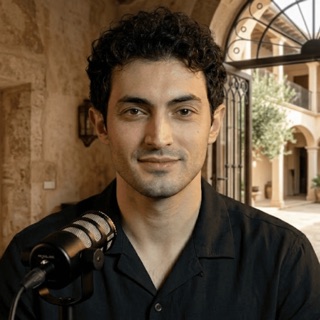
From script to split-screen in minutes
Three steps. No filming. No editing experience required.
Write or paste your script
Type your script or use VClip's AI script generator to create one in seconds. The avatar will speak every word with natural pacing and emotion.
AI generates the avatar
Pick an avatar style — professional, casual, energetic. The AI renders a realistic talking head, fully lip-synced to your chosen ElevenLabs voice.
Set layout, export
Choose split-screen (avatar left, content right), picture-in-picture, or full-frame avatar. Add captions, export in 9:16 or 16:9, ready to publish.
Three ways to show your avatar
Split Screen
Avatar on one side, your video content or b-roll on the other. Most popular format on TikTok and YouTube Shorts for commentary and reaction-style videos.
Picture in Picture
Avatar floats in the corner while your main content fills the full screen. Great for tutorial videos where viewers need to see both the presenter and the content clearly.
Full Frame Avatar
Avatar takes the whole frame — perfect for news-style intros, course lesson openers, or any video where you want a human presenter front and center.
Everything built in
No separate tools. No timeline juggling. One workflow, finished video.
Realistic AI Avatar
Photo-realistic AI presenter with natural facial expressions, blinking, and head movement. Looks like a real human on camera.
Lip-Sync to AI Voice
The avatar mouth movements are precisely synced to your chosen ElevenLabs voice. Looks and sounds like a real recording.
Split Screen Layout
Avatar on the left or right, your b-roll or screen content on the other half. Fully customizable proportions.
Animated Captions
Word-by-word animated captions automatically generated and placed over the video. 20+ styles to match your brand.
Multiple Avatar Styles
Professional, casual, young, mature — choose an avatar that matches your channel persona or brand identity.
9:16 and 16:9 Export
Export portrait for TikTok, Shorts and Reels, or landscape for YouTube. Full HD, no watermark on paid plans.
Who makes avatar videos
Course Creators
Add a professional human face to every lesson without recording yourself. Students trust a visible presenter — the avatar builds that connection automatically.
Faceless Creators
Stay anonymous while having a face on camera. The AI avatar looks like a real person — viewers engage more with a talking head than a voiceover alone.
Business & Marketing
Create product explainers, demo videos and ads with an AI spokesperson. Scale video content without booking a presenter or renting a studio.
Common questions
Generate your first AI avatar video today
No camera. No studio. A real-looking presenter in minutes.